The problem: Customer service constantly having to reset passwords and field complaints from patients having trouble with login.
What we see on Slack:
So, how to revamp the login flow to decrease errors and encourage registration?
Step 1: Research
What are some existing solutions in the marketplace?

Take 1: No password
Pros: Registration and log in flows are the same, no password authentication is easy to use and very secure, users don’t need to remember passwords, a verified email address is ideal marketing promotion in the future.
Cons: It is technically difficult to set up, engineering put it at level five effort.

Take 2: Multiple ways to login
Pros: Users have options and can chose what works best for them.
Cons: Some options require more information, adding steps to the registration flow. For the people opting for password, we would have the same frictions and would need to keep the same customer service processes in place to help people recover lost passwords.

Take 3: New tech
Pros: Biometric authentication such as facial scans and fingerprint is more secure. And the AI chatbot registration flow is easy to use.
Cons: Biometric authentication is in early stages of development and implementation. At the end of the AI chatbot registration flow, it’s difficult for users to tell if their registration is really complete.
The team likes Airbnb’s approach
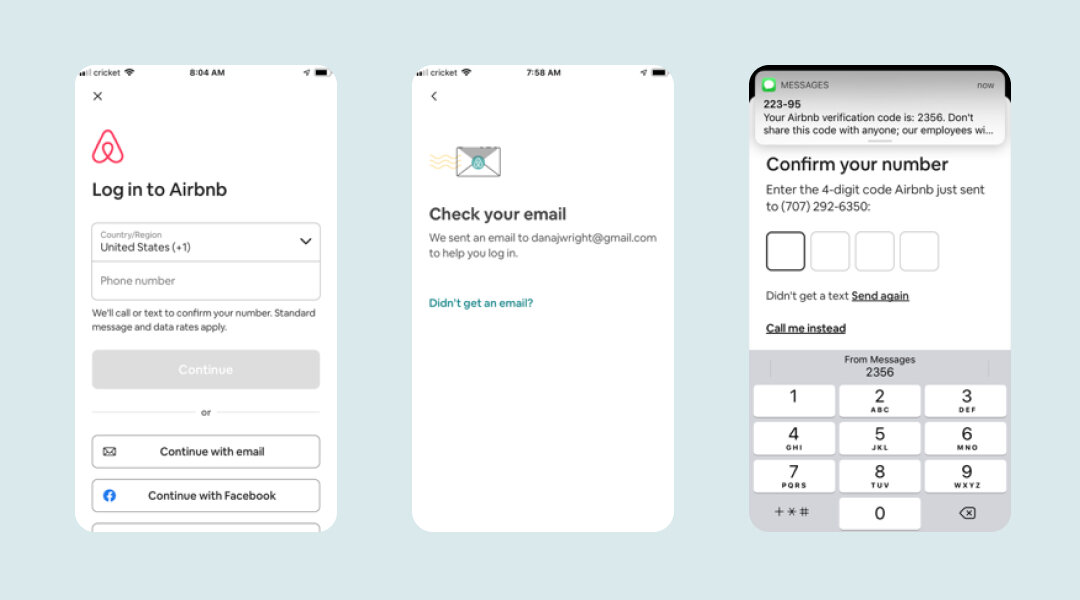
Step 2: More Research
What are consumer attitudes on online authentication?
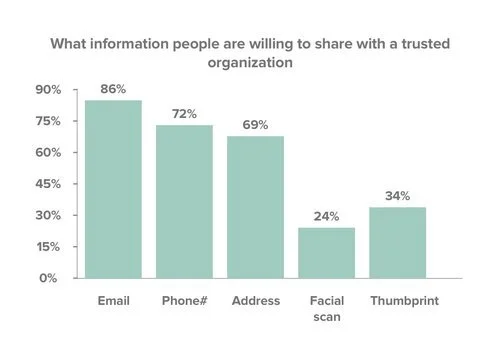
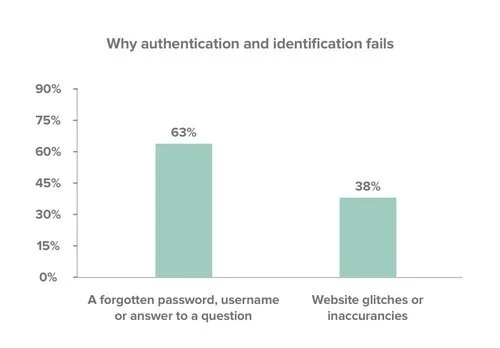
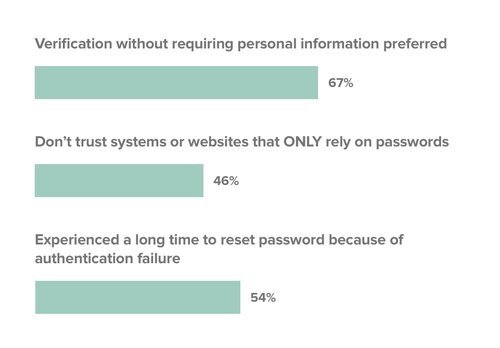
Source: Phenom Institute
The research confirms our experience: Passwords cause friction. Also, people prefer not to disclose personal information like name and address when they sign up for online services.
Step 3: Map out a solution
Registration/ login process
Step 4: Prototype
Not always but for this, definitely
Step 5: User testing
- Our group of testers found that new users who registered with email and didn’t receive the magic link got stuck.
- New users who registered with an email address could not get assistance if they didn’t receive the magic link.
- Users who choose to explore the app first were significantly less likely to create an account during their first session.